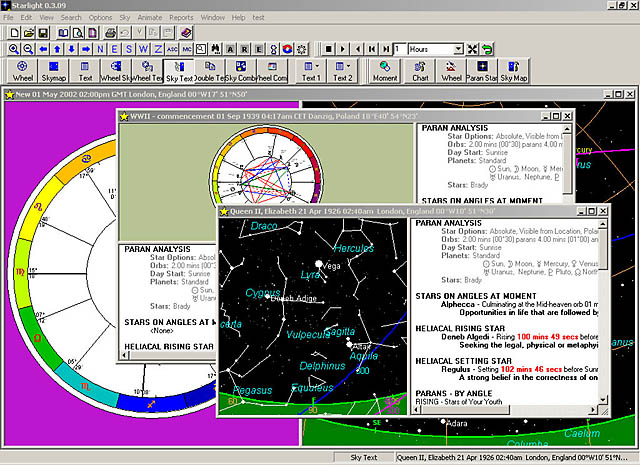
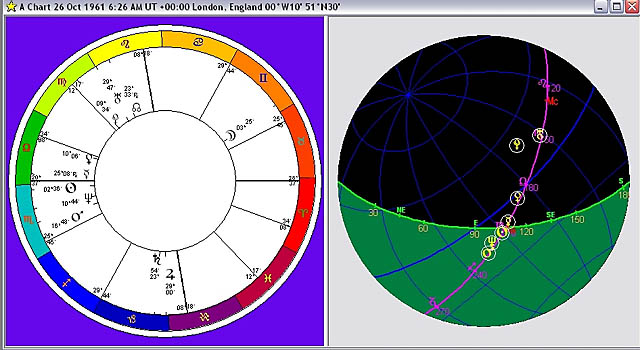
Answers to Frequently Asked Questions - New questions will be added at the end of the page and end of the Table of Contents list. If you have a question and you cannot find the answer on these web pages then please contact us.
Table of Contents
- How do I email Starlight Reports to other people... ?
- Why are parans different in Starlight to other programs ?
- How do I change the orb for parans ?
- What Zodiac does Starlight use and can I change it ?
- What is a parapegma ?
- Class not found message /File not registered?
- Will Starlight run on Vista?
- How do I list the parans by planet rather then by time period?
How do I email Starlight Reports to other people ?
RE
reports - Reports can only be printed out to a printer driver. For most
people of course this will mean their printer. But if a person also
has a PDF file maker - such as JAWS or Acrobate or some of the others
available - then they can print to that driver then of course this driver
will create a PDF and thus enable you to then email this PDf as an attachment
to another person.
Here is a Free
PDf file maker. Download this program and then use the converter
as your selected printer and e-mailing natal reports works beautifully!
http://www.pdf995.com/faq_dev.html
Back to Top
Why are parans in Starlight different to other programs?
Probably
the question I am most asked via email is:
Why are parans in Starlight different to those
of Solar Fire. So I am placing the answer to this question here in the
FAQs.
Parans are calculated by rotating a chart through
a full 24 hours, so that every planet can rise, culminate, set and reach
the lower culmination. As each planet does this then Starlight checks
to see if any bright star is also on one of the above angles at the
same time. If so, there is a relationship between the star and the planet
which we call a paran. (There is a huge philosophical background to
the importance of this relationship but that is well beyond the scope
of this posting)
Now there are two major questions that arise
from this process.
Firstly parans are a visual system - the star
culminates as a planet rises, etc. Therefore, one of the first issues
to consider is since we have to move the chart through time do we find
parans for the degree positions of the natal planets, or do we find
parans for the actual rising (or setting, culminating, lower culmination)
positions of the planets? For example, in looking at parans to a person's
moon: do we find the parans for when the natal degree of the moon rises,
or do we find the paran for when the actual moon rose? - These are two
different things. A person's natal moon might be at 10 Aries but the
degree of the moon as it rose (just to pick one of the angles) may be
15 Aries and later as it culminates it may be 18 Aries, etc etc.
Since fixed star paran were a visual system
Starlight finds parans to the actually planets rather then their natal
degrees. Indeed this is one of the reasons that Starlight was created
because no other software would do parans in the way that I talked about
in my book.
The next question to ask
is: what is the beginning of a day? To the Egyptians and Romans it was
dawn, however to the Hebrews and the Babylonians it was sunset, and
to us, in modern times, it is
midnight
local time.
Starlight gives the user all of those options
- including the options of doing parans to natal degrees rather then
the planets themselves ( the method used by Solar Fire as well as every
other software prior to Starlight.)
The default setting, and one that I have worked
with extensively and have found to gives best results is using the Egyptian
and Roman definition of a day - Dawn to dawn and working with the actual
planetary positions.
Hence when comparing a Starlight printout with
a Solar Fire printout the most difference will be seen in the faster
moving planets as those are the ones that will change their degree position
during a 24 hours period.
Remember Solar Fire is not wrong but rather
just using a methodology (like all other previous programs) which is
a method that would not have been used in ancient times. - a modern
method. I prefer to work with fixed star in the older methods - hence
the need for Starlight.
I hope this helps people who might have been
pondering this point
Back to Top
How do I change the orb for parans?
Based on
questions I receive about a lack of star planet parans in a chart I
am posting this separate post on how to change the orbs for parans.
With the chart open - or paran listing etc -
click the alternative mouse button and a drop down menu will appear.
OR select from the main menu OPTIONS.
From this menu select PARAN STARS
This opens the Paran Calculations Options
dialog box
You will notice all the different ways you can
alter how Starlight does a paran, but you will also notice that the
orbs are set for Paran orb = 2 minutes and angle orb = 4 minutes
Simply change these.
There are many other things you can play with
in this dialog box and this was one of the main research tools we developed
in Starlight to test out all the different ways of doing parans, so
you may want to fiddle with other options.
Back to Top
What Zodiac does Starlight use and can I change it?
Changing
the zodiac for one single chart
Remember Starlight considered each window as
a unique window that is to say you can have different charts open with
different zodiacs, house systems etc. If you wish to change the zodiac
for the chart that you are looking at then with the chart open select
from the main menu or by using an alternative mouse click - Options/Chart
and then on the chart option dialog box select the zodiac that you wish
to use.
If you wish to change the zodiac used globally
– so that all new charts will use this zodiac then you need to change
the default zodiac.
Changing the Default Zodiac
With NO CHART OPEN or NO parapegma open – in
other words a blank screen. Select Options/ chart. In the chart option
dialog box, select the zodiac you wish to use. Then save this by clicking
the “Save as” button and name your new chart option file. Then click
OK. This new file will now be used for all charts.
PS – this is also how you can set the default
house system, planets, aspects, nodes etc.
Back to Top
What is a Parapegma?
The parapegma
is primarily designed to show the rhythm of star phases for a given
latitude. You can find the parapegma under the TOOLs on the main menu.
You can turn any event
in the parapegma into a chart by simply double clicking on the event.
That is to say double click on a new moon then you will get the chart
for the new moon for the location of the parapegma. The zodiac used
for this chart will be the zodiac that you have selected as your default
zodiac.
Back to Top
Class not found message ?
We have had
some users suddenly getting error messages in Starlight after installing
other software- the message is:
"file not registered" or "class
not found" and will only occur after installing some astrological
software - at the moment this is ONLY happening to a few Users after
installing other software.
We believe this is an ACS atlas OCX problem
and that that the ACS ocx has been deregistered, by the new software
installed after Starlight.
If you get this problem then you can re-register
the ocx manually and get Starlight working again. The instructions
are as follows:
Click on Start> Run from the Windows
task bar. In the dialog box that is displayed enter
regsvr32 "C:\Program Files\Starlight\acsatlas.ocx"
and click on OK. A message should then be displayed
saying "DLLRegisterServer in C:\Program Files\Starlight\acsatlas.ocx
succeeded".
Your Starlight should then run again.
Back to Top
Will Starlight run on Vista?
Yes Starlight runs on Vista, indeed this is what it runs on all my machines.
Back to Top
How do I list parans by planet rather then by time period?
Parans can be listed in two ways the default is by time period, which also gives you the Heliacal Rising and Heliacal Setting stars but you can also list the natal parans just by planet - which is handy when you want to simply check what parans are linked with what planets.
To change the way parans are listed for just one
example
With a page of parans open click on the "Text 1" large button in
the main menu on the main screen. From that drop down menu then select
"Parans 2" you will notice the parans are now listed by planet.
To change the way parans are listed for the default settings
With no parans or chart open select "Parans 2" from the "Text 1" menu.
While you are looking at these text1 features try selecting different options to explore what other information that Starlight can list for you.
The features in the Text 2 button are the same but control the text box in the combination screens of chart or sky map PLUS text beside the map (Text 1) and text beneath the map (Text 2 options".