| The Fixed Stars and Your Chart -
Click on a image to explore the screen shots |
 |
Many Charts
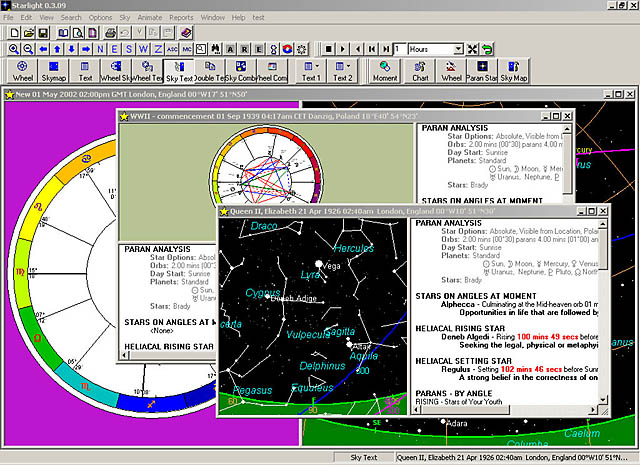
Open multiple charts or screens each chart can be a different house
system, aspects, points and so on. |
 |
Different Wheels
Select from different wheels, in any colours that you wish. |
 |
Chart and Sky Views are Linked
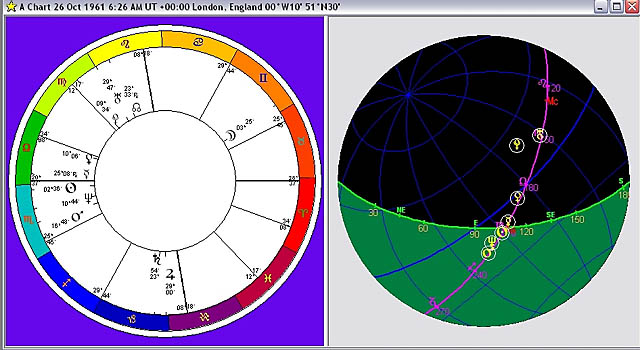
View the chart with the sky and the stars for the moment of birth. |
 |
Fixed Star Meanings
View the Fixed Stars linked to the chart, via parans. Star and planet
delineations by Bernadette Brady, author of Brady's Book of Fixed
Stars. |
 |
Animatation
Animate the chart and sky, watch how the chart moves through time
and how the horoscope reflects the moving sky. See a planet rise
in the chart, and watch it rise in the Sky Map. Use the Starlight
sky navigator to help you moved around the night sky. |
 |
Understand the Chart and Sky
See the ecliptic (the ring of the zodiac around the chart) in both
the chart and the sky at once. Note the planets in the chart, and
notice how that are placed in the sky. |
| Explore and Learn the Sky -
Click on a image to explore the screen shots |
 |
Viewing the Sky
Look at the sky, in the city and then .... |
 |
Adjusting the View
Go out to the country, and see the difference... can you see Scorpio?
|
 |
Two Views
With Starlight's multiple screens, you can set up two views of the
night sky, one to match what you see, the other to show you the
constellations, and star names. Now can you see Scorpio? Look at
the stick figure, then look at the sky. Learn to see the constellations
in the night sky. |
 |
Constellation Myths
If you want more then just a stick figure to help you see the image,
click on the constellation.... and see the image of the constellation,
and the mythology linked to it, with the text written by Bernadette
Brady. |
 |
Sky Myths
Or look to see if you can recognise Orion, and then discover his
myths and history. |
 |
Sky Grids
Can see anything?? Never know where to look? Can't see the horizon?
Then turn on the azimuth grid and simple look directly above your
head, and start learning the sky from there. |
 |
SkyMap Options
The Sky Map options and Sky Map tool bar, allows you to easily
set, change, turn off and on all manner of variables, from the brightness
and visibility of stars, to the names that are shown, to the spacing
of any of the major celestial grids, to the manner in which the
planets are displayed. |
| The Ancient Star Calendar... The Parapegma
- Click on a image to explore the screen
shots |
 |
The Star Calendar
3,000 years ago the parapegma was the centre of daily life. When
people lived by the rising and setting of stars. A engraved stone,
with peg holes, so that pegs could be placed in the correct position,
announcing the first visibility of certain stars. Which stars ruled
the day, the period, when to plant and when to harvest.
Starlight returns the parapegma to the astrologers tool kit.
The date, time, and phase of every star as it returns to earth or
become the evening or morning star - cosmic or apparent. Lunar phases,
and planetary ingresses. |
 |
Parapegma Options
Starlight gives you total control over the information that
you see in the parapegma, the stars set used, planets used, length
of time and other celestial events. |
 |
Create Charts for Celestial Events
Click on any celestial event - a star rise, a lunar phase, a planetary
ingress and Starlight will produce the chart for you to explore
parans, or mundane events, or go to a full report. |
The Star Catalogue -
Click on a image to explore the screen shots
Starlight has over 9,000 stars - every
visible star in the night sky. The star catalogue has been complied
starting with ALL of Ptolemy's bright stars, and his comments. Added
to this master set of stars is all of the Yale Bright Star Catalogue
plus additional material on star names gathered from many sources.
If a star has a name, it is in Starlight, if a star just has a number
but can be seen, it is also in Starlight....
Starlight allows you to use ALL of these 9,000 stars in chart work,
the parapegma and of course the night sky.. Never before have astrologers
had access to the whole visible sky.
In order to handle this extraordinary large star catalogue Starlight
provides you with ways of searching and selecting stars, to create
your own star sets. |
 |
Creating Sub Sets of Stars
This is a listing of every bright red star in the sky, this sub
set of stars was created from the master catalogue. |
 |
The Catalogue Search Engine
Create star sets using Starlight's special star catalogue search
engine. This example is to create a star set which is every bright
star whose proper name stars with "A". |
 |
Saving Star Sets
Save these star sets to use in chart parans, parapegma, reports
or research. |